

Today, the internet is awash with various businesses to make money. A quality web design is the best investment you can make since it’s one of the modern doorways to online presence.
Functional and well-designed websites enable you to stay afloat in the current competitive setting. Besides, 75% of web users agree on judging a company’s reliability just by looking at their web design.
That’s why in the first minutes of visiting a website, people would prefer looking at a striking design instead of something plain and boring.
Therefore, web design is an important aspect of the world of marketing. Read on.
What is Web Design?
Look around; there’s design everywhere.
More specifically, web design is creating and giving life to the idea. It involves planning your goal before you achieve it. Design is also the appearance and usefulness of your good or service. Above all, the objective of web design is vital in helping you achieve the desired goal.
Conversely, design arouses emotions and can be emotionally persuasive. A fundamental element of your branding creates the colors, identity, and consistency that are distinct.
Therefore, a good business understands the need to allow experts to handle tasks such as their website design. Irwin Hau, Owner of Chromatix, said that web design these days is beyond looking good. Also, it provides peace of mind and ample room to focus on other aspects of the business.
Besides, your website is the perfect tool for marketing and a credible source of confidence. Mr. Hau of Chromatix also noted that custom-made website designs can generate more leads. Thus, a good website design will be the perfect tool to enhance your marketing capabilities.
Why is Web Design Needed for Marketers?
First Impression
As stated, it takes seconds for a visitor to observe the design of your website and make a decision, so make it count. Most importantly, good design will make any user landing on your site feel good. So, a modern site with a proper layout and bright colors welcomes and encourages visitors to stay longer.
So, why would anybody want to look at dark, old-fashioned graphics and poorly navigated sites?
Without a doubt, first impressions matter. You don’t want your site to start badly with potential customers visiting to know your business. Besides, convincing a customer to stay with a poor first impression is impossible.
Furthermore, promoting your page is expensive and takes a lot of effort in building content and PPC campaigns. So, it would help not waste your time and money to bring visitors to your site only to leave.
User Experience
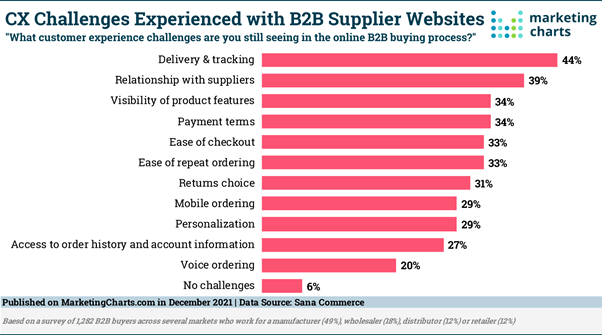
Image source: https://www.marketingcharts.com/industries/business-to-business-119155
A well-crafted website will create an individual journey for its customers. This way, a customer will easily explore, engage, and interact with the brand. First impressions should be significant from brand to customer to impact the concept and general objectives for a brand.
User experience is becoming a vital investment for a brand. Therefore, users expect a reliable and responsive website that mirrors the brand’s vision, outlook, and function.
Moreover, ensuring the success of a website relies on the ideal user experience. This is possible through calculated plans like user testing and A/B testing.
Variation
It is vital to vary from competitors. And when a website is old-fashioned and awkward, that website tends to get high bounce-back rates. Most times, the straightforward thought of creating a website within a model and adding your business information is tempting. However, it’s not that simple.
Marketers can confidently tell you that a custom website requires a storytelling perspective and aligned visuals. This way, it makes an unforgettable impact on the market and customer.
SEO
SEO makes a website appear in sequential order, starting with the most popular in a search engine. Correct SEO practices involve using applicable keywords to link to your website as long as they target your audience.
Most importantly, it would help users interact suitably with your website with SEO.
Other SEO practices include;
· Links and keyword research that you need to apply to a website
· Constantly and consciously updating these links to stay significant
· Dynamically positioning content to maximize visibility in search results
Brand Influence
A brand will only create influence if it nurtures a steady relationship with customers. This also leads to brand loyalty since users will trust your brand and not the products.
Several factors lead to brand influence. Above all, a digital marketing presence enables these connections through a digital network.
Furthermore, brand influence plays an essential role in building a brand, including marketing to millennials. Undeniably, such a category wants to associate and relate to a brand they feel good about.
When you convert your customers especially using an online community interaction, they will help with;
- Introducing new products
- Keeping high maintenance
- Impacting the general bottom line
Usually, many consumers engage different brands online before settling on a purchase. For this reason, an incorporated website marketing strategy will help to reach and convert leads everywhere, online and offline.
Conversion
It is vital to observe conversion rates when evaluating a website’s performance metrics based on the best customer experience (CX). A conversion rate directly connects to how a user interacts with the website. Therefore, a business needs to take control in making marketing decisions.
Subsequently, proper strategizing of web design directly affects conversion rates. Though web design templates are cheap and simple, these will cause a huge adverse impact on the conversion rate and user experience.
Unclear navigation can make the user explore and fail to get the required information from a website. When this happens, the user instantly leaves and visits another website – perhaps a competitor’s website.
Take Away
There’s no doubt a new website can be a retune for a failing digital marketing strategy. After spending time, money, and effort to lure customers to your website, ensure they quickly find what they are looking for.
A business has a steady online presence and a well-built website, leading to a positive brand image. As a result, it will build a steady marketing campaign across media platforms, improve sales, and build PR.